
Three weeks before the company family fun day, the venue is booked, the food trucks are signed, and someone on the planning call asks whether you can add virtual reality this year. You've seen the setup at a trade show: a small crowd around a headset, a line that either moves or doesn't, and one person in a branded polo keeping the whole thing alive.
That last detail is the one most planners miss. Rented VR isn't a box you switch on. It's a staffed attraction with a queue, a power draw, a hygiene routine and a failure mode, and it rewards the same planning you'd give a rock wall or a mechanical bull.
Nothing here is designed to talk you out of it. VR puts a memorable ten minutes in front of a guest who has already done the inflatables twice. The work is in choosing the format that fits your site and your staffing before the quote conversation starts.
VR Rental Formats Compared at a Glance
Four formats cover nearly every booking, and each one answers a different question about your site.
| Format | What Arrives | Best Fit | Typical Guest Flow |
|---|---|---|---|
| Stationary rig | A tethered or standalone headset at a fixed station | Trade-show corners, lobbies, demo tables | One guest at a time, 5 to 10 minute sessions |
| Mobile VR pod | An enclosed or standalone pod on a trailer or cart | Festivals, campuses, parking lots | One guest at a time in private, shaded space |
| VR truck | A full vehicle with several stations | Large public events and community festivals | Several guests playing in parallel |
| Multiplayer set-up | Linked headsets sharing one virtual space | Team challenges and corporate competitions | Groups of 2 to 6 playing together |
A stationary rig answers a single question: can we fit VR into the room we already have? It's the cheapest format to run and the easiest to supervise, because the guest stays in one spot and the cable, if there is one, never travels. A mobile pod answers a different question: can we run this outdoors without a building? It gives each guest a shaded, private box and takes the weather risk off your indoor space.
A VR truck answers the throughput question. Several stations run in parallel, so a queue of 200 people becomes a scheduling problem rather than a capacity ceiling. Multiplayer set-ups answer the one question the other three can't: can a group of colleagues or classmates play the same thing at the same time and compare notes afterwards?
How to Choose Between Them
Choose the format by how many guests need to play at once and whether the event runs indoors or outdoors. Everything else, content, staffing, price, follows from those two answers.
If your site is a fixed indoor footprint rather than an open field, the logistics resemble our mobile escape room rentals: a set footprint, a staffed queue, and a defined session that ends on time. Same discipline, different hardware.
What a VR Rental Includes
A venue may have room for several headsets but still lack the power, staffing or floor space to run them safely. Confirm what the rental includes before choosing a setup. Equipment, content and on-site support all affect how guests move through the activity.
A technician is unloading equipment.
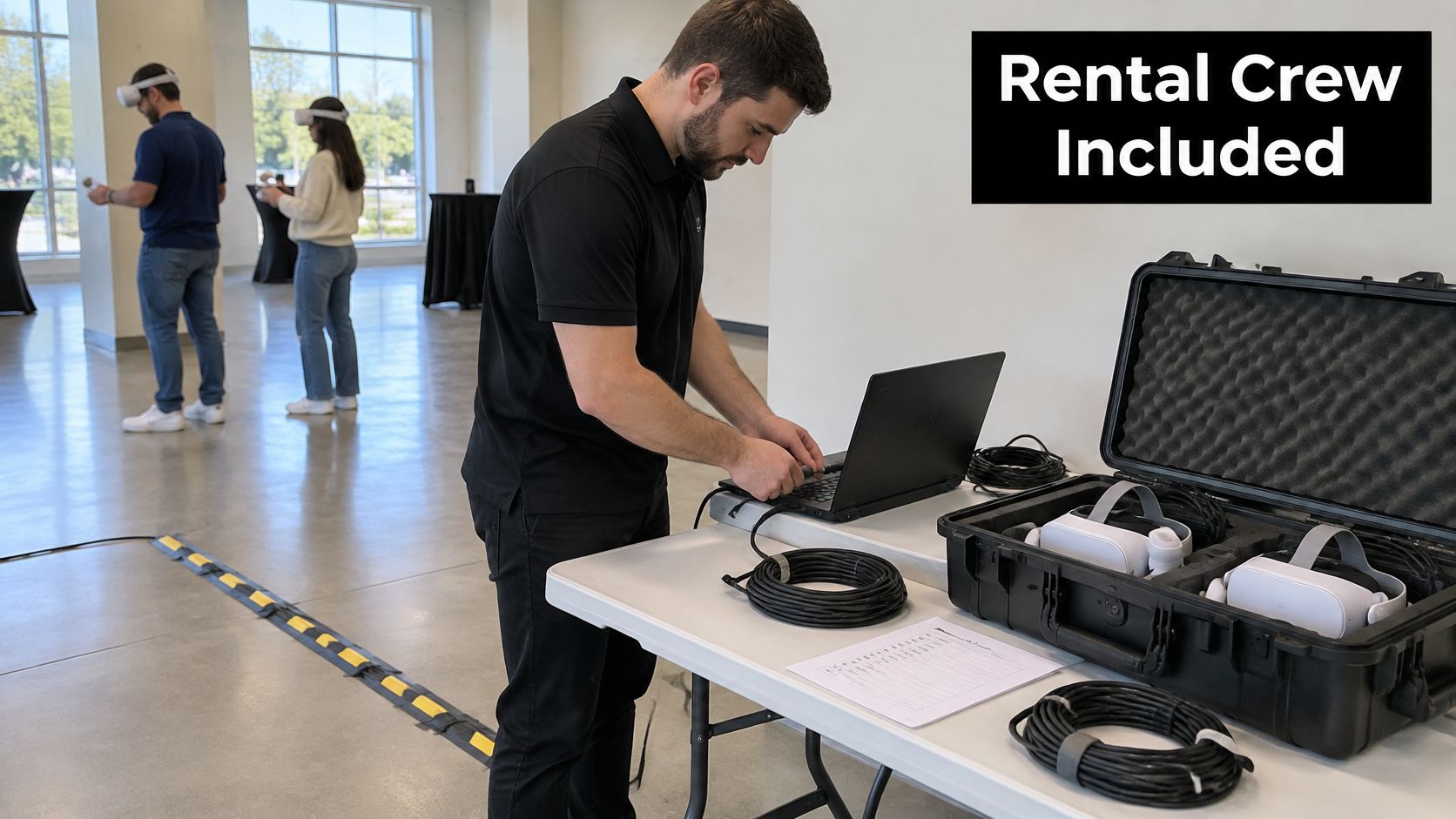
A rental package may include:
- Headsets: enough units for the planned station count, with a spare available if a device needs to be taken out of use.
- Compute: a gaming PC for each rig or standalone headsets. PC-based systems need more cabling and power; standalone devices reduce those demands.
- Software: a selected library of titles suited to the audience and event.
- Cleaning supplies: wipes and, where provided, wipeable face inserts. Agree on how used materials will be handled between guests.
- Attendants: staff to start sessions, manage the queue and watch for signs of discomfort.
- Power and transport: the cabling, floor mats, cases and vehicle needed to bring and set up the equipment.
The Oculus Rift, HTC Vive and PlayStation VR all launched in 2016, a milestone in the consumer headset market noted in Statista's VR dossier. For event planning, the important distinction is the equipment included in the quote and who will operate it on site.
A VR rental is a time-limited installation that provides guest sessions using equipment supplied and maintained by the operator.
Before signing, confirm the headset and spare count, who supervises play, and which titles will be loaded. Also ask how the setup handles a headset fault or a guest who needs to stop early. A clear answer helps you judge whether the package fits your space, power supply and staffing needs.
Which Events Get the Most Out of VR
The audiences that gain most from a rented VR station are the ones where guests already expect to participate rather than spectate. Corporate family days and team events benefit because VR gives colleagues a shared activity with a score attached, and a leaderboard does more for cross-department mixing than another round of trivia. Schools and universities use it as an orientation and homecoming draw, where novelty competes hard against phones. Community festivals get a high-interest stop that pulls foot traffic toward the quieter end of the field, and private parties for teens and adults get a headline activity that photographs well.
The demand behind that is measurable. Eventbrite's 2024 TRNDS research, run with MarketCast among 1,999 organizers and attendees, found that 52% of event organizers considered new technologies, including augmented reality, virtual reality and event-specific apps, extremely important for improving the event experience. The same research reported that 76% of attendees would pay a higher ticket price for a technology-enabled event. Meeting professionals are moving too: American Express Global Business Travel's 2024 forecast, based on more than 500 professionals worldwide, found that 41% expected to explore virtual-reality technologies for events.
The trade-off: VR is one station in a program, not the program. It doesn't replace food, networking or live entertainment, and an event built entirely around headsets tends to empty out once the queue clears.
Fit signals worth checking before you book:
- A high-interest audience: guests who will tolerate a queue if the payoff is good.
- A controlled session length: a program that can absorb five to ten minute slots in a rotation.
- Supervision on the ground: staff available to run the line, not just the hardware.
The corporate version of that thinking shows up in our corporate party rentals, where headcount and staffing decisions come before the equipment list.
Run one test. If your only slot is a fixed one-hour window and nobody is free to supervise it, you don't want a truck. You want a two-station stationary rig and a visible wait time.
Space, Power and Staffing Each VR Format Needs
Every row below is a planning baseline to confirm on site, not a fixed rule. Measure before you commit.
| Format | Clear Space | Power | Staffing |
|---|---|---|---|
| Standalone headset station | 2 m x 2 m per player | One 15 A circuit for up to four stations | One attendant per three to four stations |
| Tethered PC rig | 2 m x 3 m including cable run | One dedicated 20 A circuit per rig | One attendant per station |
| Mobile VR pod | 3 m x 4 m level pad plus approach path | Generator or 30 A shore power | One attendant plus one operator for setup and transport |
| Multiplayer set-up | 3 m x 3 m per group | One standard circuit per four headsets | One facilitator per group |
Clear Space and Cable Paths
Keep the stated play area clear of furniture, and hold back a cable path plus an exit route that a guest can find with a headset on. That exit is the part people skip. A guest who gets dizzy will reach for something, so the nearest object needs to be a person or open air, not a table corner.
Power and Staffing
Check the circuit before arrival rather than during setup. Don't share a circuit with food vendors or the sound system, because a fryer cycling on and off is a far more common cause of a dropped session than any software bug. For pods outdoors, plan generator or shore power and confirm who refuels.
Standalone stations are the most forgiving ratio in the table because the attendant's job is queue management and wiping, not troubleshooting. Tethered rigs need a person per station.
Content Delivery and the Network
Streamed content is where good plans fall apart. ITU-T requirements for strong-interaction extended-reality services map a comfortable 8K experience to at least 260 Mbit/s of aggregate bandwidth and an end-to-end round trip below 15 ms, while ideal 8K service may need at least 1 Gbit/s below 8 ms, as Monash University's VR guidance sets out. Prefer locally rendered or offline content. If streaming is unavoidable, run an RF survey, use dedicated access points or wired backhaul, and test latency under concurrent traffic instead of trusting the venue's advertised Wi-Fi speed.
Two weeks out, walk the site with this list:
- Footprint: tape the play area and the queue zone on the floor.
- Circuits: identify which breaker serves each station and label it.
- Network: test the connection with everything else running at once.
- Access: confirm load-in doors, floor protection and lift access.
- Weather: for outdoor pods, name the indoor fallback before you need it.
How VR Rental Pricing and Packages Work
Two quotes can list the same number of headsets and still differ substantially. Compare the staffing, operating hours, delivery requirements and setup work alongside the equipment.
- Station count: More headsets usually mean more equipment, attendant coverage and setup time.
- Session length: Short sessions can increase guest turnover and the staff time needed to manage rotations.
- Total event hours: A four-hour event and a ten-hour event may share setup costs, but require different operating hours.
- Delivery distance and load-in: Stairs, long carries and restricted access can add labor time.
- Staffing: Check whether the quote covers attendants, a supervisor and technical support.
- Setup and teardown: Confirm whether both are included in the quoted total.
- Content selection and preparation: Custom or themed software may cost more than an off-the-shelf library.
- Insurance documents and site compliance: Ask whether venue paperwork and required certificates are included.
Staffing changes the cost per guest. A multiplayer setup with a dedicated facilitator needs more staff coverage than a standalone station, even if the hardware investment is similar. That extra coverage may be worthwhile when guests need more guidance or when smooth rotations matter more than maximizing throughput.
Packaging Models You'll See
| Model | How It Is Billed | Best For |
|---|---|---|
| Day rate | Flat fee for an event day, with setup and teardown terms specified in the quote | Corporate family days and single-day festivals |
| Hourly rate | Charged per operating hour, with setup and transport listed separately or included | Short activations and irregular or split schedules |
| Per-station rate | Charged per station, scaled to the number of stations | Modular programs where the planner sets the station count |
A useful comparison starts with the same assumptions: event hours, station count, staffing, delivery access and content. If one quote leaves any of these unclear, the apparent lower price may not cover the same service.
Ask providers for a line-item quote covering equipment, staffing, transport and any insurance-related costs. Phantom Entertainment's pricing information is one place to check when comparing event options.
Safety and Hygiene Rules for Shared Headsets
The core risk isn't a broken headset. It's cybersickness that empties a queue and pulls two staff members away from their stations to deal with one guest.
Frame-rate floor: NATO technical guidance recommends sustaining at least 90 frames per second, with frame-render times inside the display refresh interval for at least 95% of frames and 99% considered highly desirable, as set out in the HFM-MSG-323 technical report.
Configure for that standard before doors open:
- Set comfort modes first. Use teleport or stationary experiences, because artificial movement without self-motion is the most common trigger.
- Turn on dynamic vignetting where the headset supports it. It narrows the peripheral view during rapid motion, which is exactly when nausea starts.
- Test every title on the exact hardware onsite. Frame rate varies by machine, and a title that ran smoothly in the warehouse can stutter on a different graphics card.
- Lead first-timers into low-motion content. A short, gentle session builds confidence and gets the guest back in line for a second one.
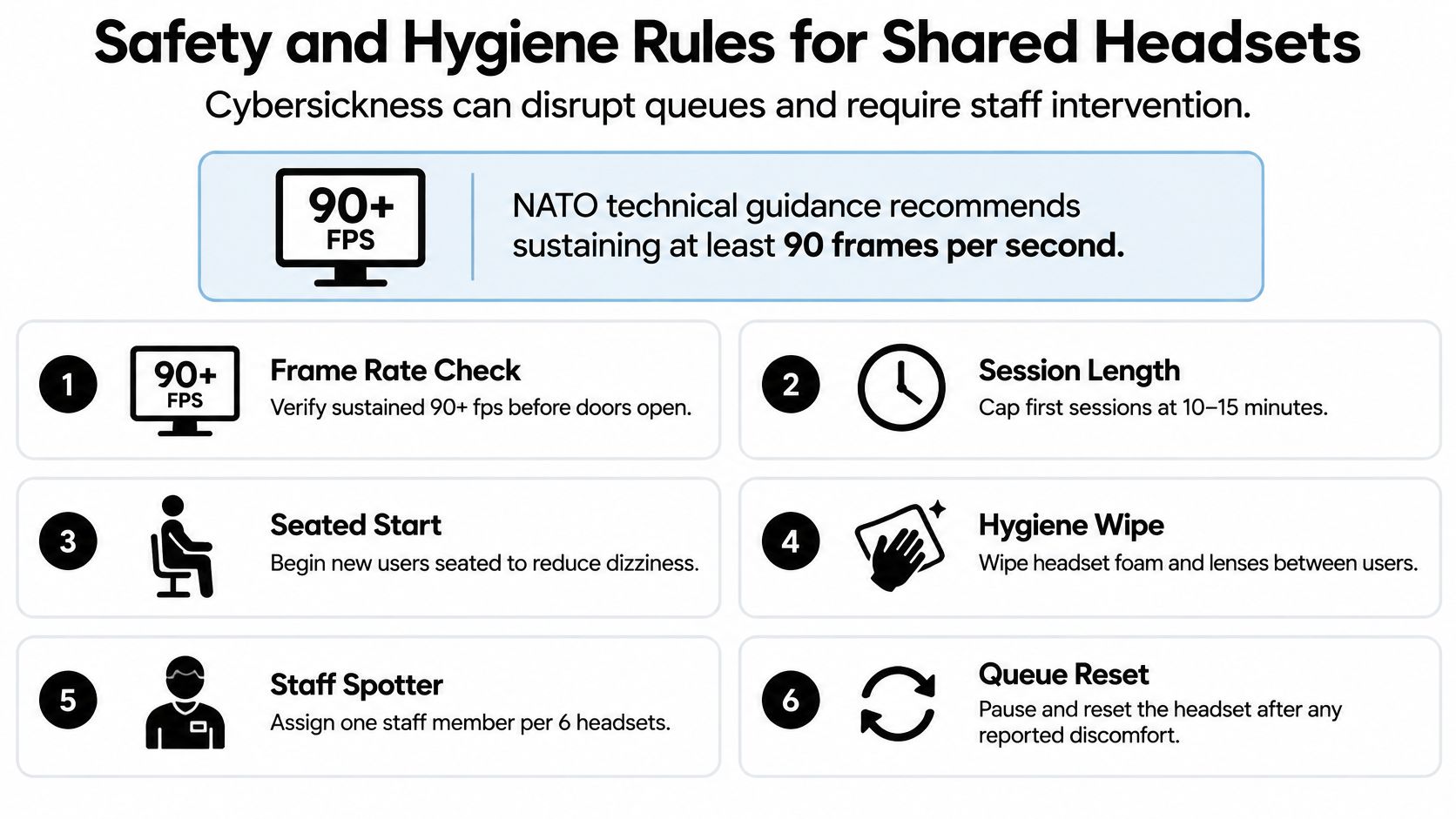
Shared hardware is the second half of the protocol. Wipe the face interface and controllers between users with approved wipes, let surfaces dry, and keep spare wipeable inserts for peak periods. Staff should watch for leaning, balance loss, dizziness or a verbal complaint and end the session immediately, then log it. For paid sessions at scale, Studio Liddell's location-based VR throughput and safety guide is a sensible read on keeping that line moving.
Including Guests with Accessibility Needs
The most common barriers at VR events aren't technical. Research on VR events involving young people with vision impairment identified environmental inaccessibility, safety concerns, misconceptions about what participants can do, and weak awareness of participant needs as the major obstacles, alongside real gains from practical assistance, advance explanation, shortened sessions and continuous comfort monitoring, as reported in Disability & Society.
None of those fixes cost much. They cost attention.
- Collect access requirements at registration, on the same form as dietary needs, so you're not triaging at the station.
- Reserve accessible play slots in the rotation rather than relying on staff to squeeze someone in.
- Offer a seated or non-VR alternative at every station, with a chair, a screen and a role for the guest.
- Make room for glasses, mobility devices and a support person inside the taped area, not outside it.
- Send a short what-to-expect note beforehand covering session length, sound, movement and the opt-out.
Pacing and comfort settings follow the safety protocol above. Apply the same settings to every accessible slot.
The contrarian point is worth stating plainly. Maximizing headset utilization is not always the best event outcome. Shorter rotations plus inclusive alternatives often produce higher overall participation and fewer complaints, because the guest who can't wear a headset still joins in and doesn't spend the day telling people the line was pointless. If your site has several arrival points and mixed mobility needs, Waymap's briefing on accessibility for venues and transport is worth twenty minutes.
Hand the provider a documented accommodation plan before the event: each guest need, the slot assigned, the alternative on offer.
Scheduling Rotations and Contingency Plans
Build the schedule around the format, not the other way round. Stationary rigs and pods run best on five to ten minute sessions with timed rotations, so every guest holds a defined slot and the queue never becomes a crowd.
Place the queue outside the play area, show a visible wait time, and cap the number of people per station so an attendant can supervise the line and the player at once. A queue that grows past a fifteen minute wait is the point where guests drift away and the activation stops earning its footprint.
Then plan for the failure, because something will fail.
- Keep one spare headset or pod per cluster. A dead unit becomes a swap, not a stoppage.
- Pause the queue, swap the device, resume in order. Sending the line away and rebuilding it costs more goodwill than a five minute hold.
- Offer the non-VR alternative during any outage past five minutes. A screen, a chair and a seated demo keeps guests in place.
- Log every incident with time, station and cause. The pattern across a single day tells you what to change for the next one.
Guest data is a short conversation handled early. Don't require accounts to play, remove any profile a session creates, and get consent before recording names or photographs. Post-event, collect sessions run, completed sessions, early stops, incidents and guest feedback. That's the report an HR lead or a principal needs to justify the spend against participation.
Book Your VR Setup for the Event
Three steps finish this.
First, pick the format from the first table, based on how many guests need to play at once and whether the event runs indoors or outdoors.
Second, confirm the space, power and staffing baseline for that format, then collect accessibility requirements and lock the comfort plan. Both sides need to be settled before money enters the conversation, because a quote that ignores site conditions is a quote you'll renegotiate during load-in.
Third, request quotes. Ask for a line-item breakdown that separates equipment, staff, transport and insurance, plus written confirmation of the content loaded and the comfort settings enabled.
Booking details and contact information sit on the Phantom Entertainment website, alongside event highlights from past seasons and the pages for DJ Parties, Disc Jockeys, Corporate Parties, Church Events and College Events.
Before you book anything, send three questions to whichever provider you're considering.
- How many guests can play at once, and how long is each session?
- How much clear space and how many circuits does the site need to provide?
- Who supervises each station, and what happens if a unit fails?
The answers tell you more about the operation than the price does.
Phantom Entertainment has been delivering staffed, insured attractions for events across Pennsylvania and the Mid-Atlantic since 1979, and virtual reality sits in the same inventory as the inflatables, mobile escape rooms and laser tag that fill the rest of the field. If you're planning a family fun day, a school field day or a corporate event and want the VR station scoped against your real space, power and staffing, the team can walk the site with you and put a line-item quote together. Visit Phantom Entertainment to see the full lineup and start the booking conversation.
Ready to Book Your Event?
PA state-inspected, fully insured since 1979. Call us or get a free quote today.