

The DJ has barely finished the first dance set when the request line starts forming. A parent wants a classic sing-along, students are asking for current pop, and a company team has already chosen a duet. Meanwhile, there are only a few minutes between performances, the next singer needs the right lyrics on screen, and the dance floor can't sit in silence while someone searches for a track.
Good dj karaoke music planning solves the entire event-flow problem, not just the song-search problem. You need a platform that fits the audience, tracks organized by era and energy, a queue that one operator can control, dependable microphones, protection against internet or hardware failures, and a clear understanding of public-performance responsibilities. The eight options below move from portable and budget-friendly tools toward professional DJ systems, with practical notes on where each one works, where it falls short, and how to prepare around its limits.
For background on software that can support event backing tracks and related production workflows, see this guide to backing track software for video.
1. Singa Karaoke App
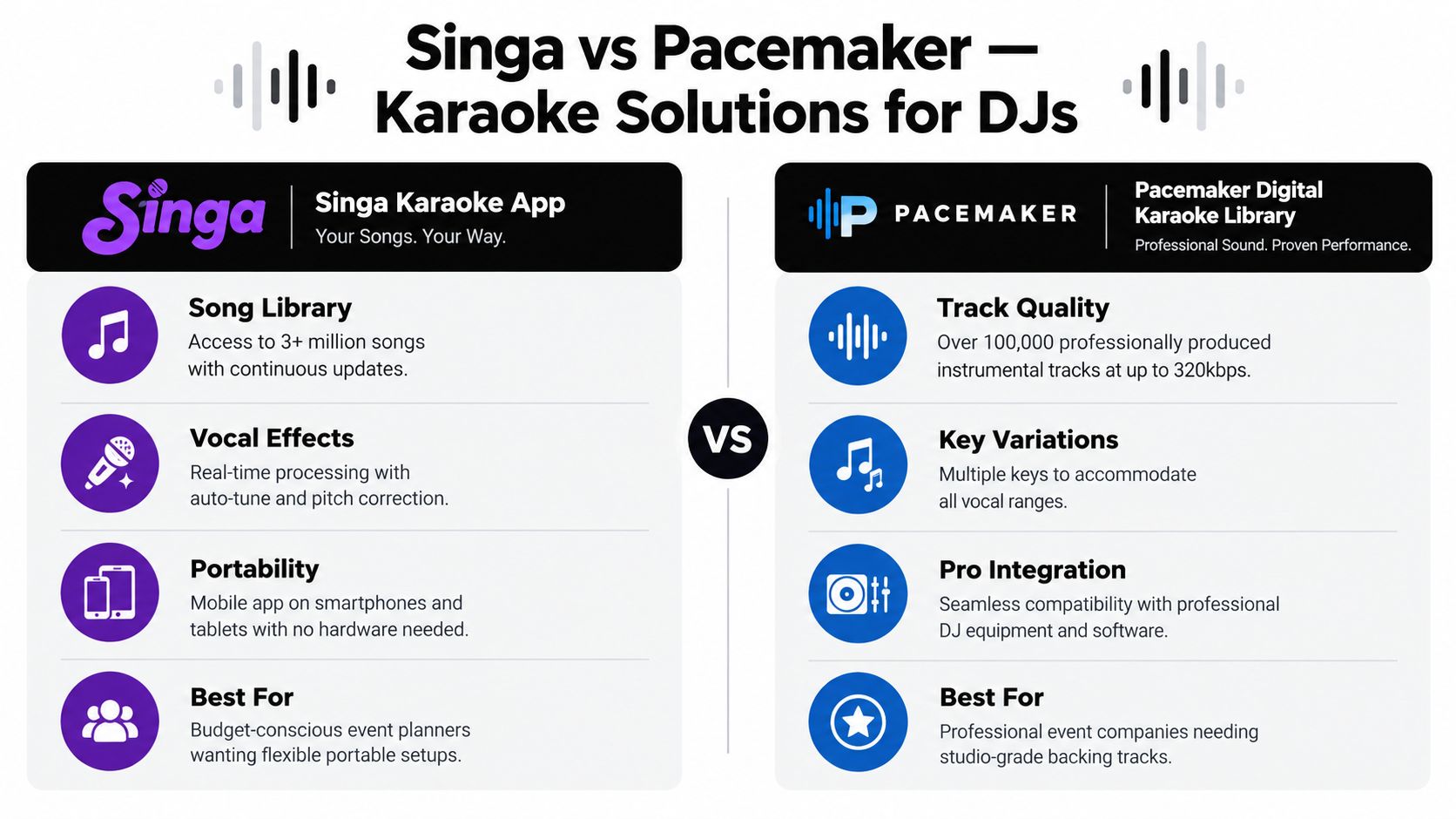
Singa suits the DJ who wants a compact, app-based way to add karaoke without building a full rack of dedicated hardware. Guests can choose from a broad song catalog, while the operator manages playback, microphones, and the overall pace from a primary phone, tablet, or computer. Its vocal effects and pitch-related tools can make casual singers feel more comfortable, but they won't compensate for weak speakers, poor microphone technique, or an unmanaged queue.
The strongest use case is a social event where participation matters more than formal competition. A corporate team can use it as an icebreaker, a university can create a smartphone-led karaoke station, and a birthday host can let guests suggest songs from their own devices. Those examples work only when the DJ keeps control of the main playback device. Allowing every guest to take over the system creates inconsistent volume, skipped tracks, and dead air.
Where Singa fits best
Singa is a good match for smaller rooms, informal celebrations, and events where the audience is comfortable with mobile technology. Pairing it with a quality speaker and a proper mixer will produce a more controlled result than relying on a phone or tablet speaker. A Bluetooth connection can be convenient, but a wired audio path is usually safer for the main system because it reduces pairing problems and unexpected device switching.
Before guests arrive:
- Build an event playlist: Group songs by decade, genre, and energy so the next choice is easy to find.
- Test the venue connection: Streaming interruptions can stop a performance at the worst moment, so check the actual room rather than assuming the venue's Wi-Fi will be adequate.
- Prepare offline access: Download or pre-load likely selections where the platform permits it, especially for outdoor events.
- Keep one control device: Let the DJ manage the queue and use guest phones only for suggestions.
The app is less suitable when the event requires elaborate lighting integration, multiple operators, or a highly structured show. In those cases, a DJ-focused library or controller offers more direct control. For event planning and karaoke service context, review Phantom Entertainment's karaoke services.
2. Pacemaker Digital Karaoke Library
Pacemaker is aimed at DJs who need a more deliberate catalog strategy than a casual karaoke app provides. Its professional-oriented library supports event preparation, track selection, and key decisions for singers who may struggle with the original arrangement. That matters at mixed-age events, where the right song often depends less on what is popular generally and more on whether the available version suits the person holding the microphone.
A family fun day might need classic party songs, current youth selections, group choruses, and clean versions in the same operating session. A corporate picnic may call for recognizable songs across several generations. A church youth event adds another filter, because the operator needs to review lyrics and genre suitability before the first request reaches the screen.
Catalog breadth isn't the same as audience fit
A large library can create its own operational problem. If the DJ searches every request from scratch, performers wait and the room loses momentum. Pacemaker works better when the operator turns the catalog into event-specific folders or playlists before load-in.
Use separate groups such as:
- Opening sing-alongs: Familiar, accessible songs that invite participation without demanding a strong vocalist.
- Featured performances: Tracks with suitable keys and arrangements for planned singers.
- Group numbers: Songs with obvious choruses that can involve the audience.
- Closing selections: High-recognition tracks that return the room to dancing.
Key variation is useful, but it creates a preparation responsibility. Don't wait until a singer is on stage to discover that the chosen version sits outside their comfortable range. Ask featured performers for preferences in advance, then keep an alternate key available if the system supports it.
Pacemaker's limitation is that it still depends on operator judgment. A catalog cannot decide whether a song will stall the dance floor, conflict with the event's age range, or fit the venue's content rules. Download essential tracks before an outdoor event, and keep a DJ music fallback ready. Karaoke should remain one part of the entertainment system, not the only source of sound.
3. Karafun Player
Karafun works well when the event needs visible structure. Its desktop and mobile interfaces support karaoke playback, lyrics display, and features such as duets and scoring, so the DJ can turn singing into a programmed activity rather than an open-ended request line. That makes it useful for corporate talent shows, school activities, family competitions, and celebrations where guests enjoy a game element.
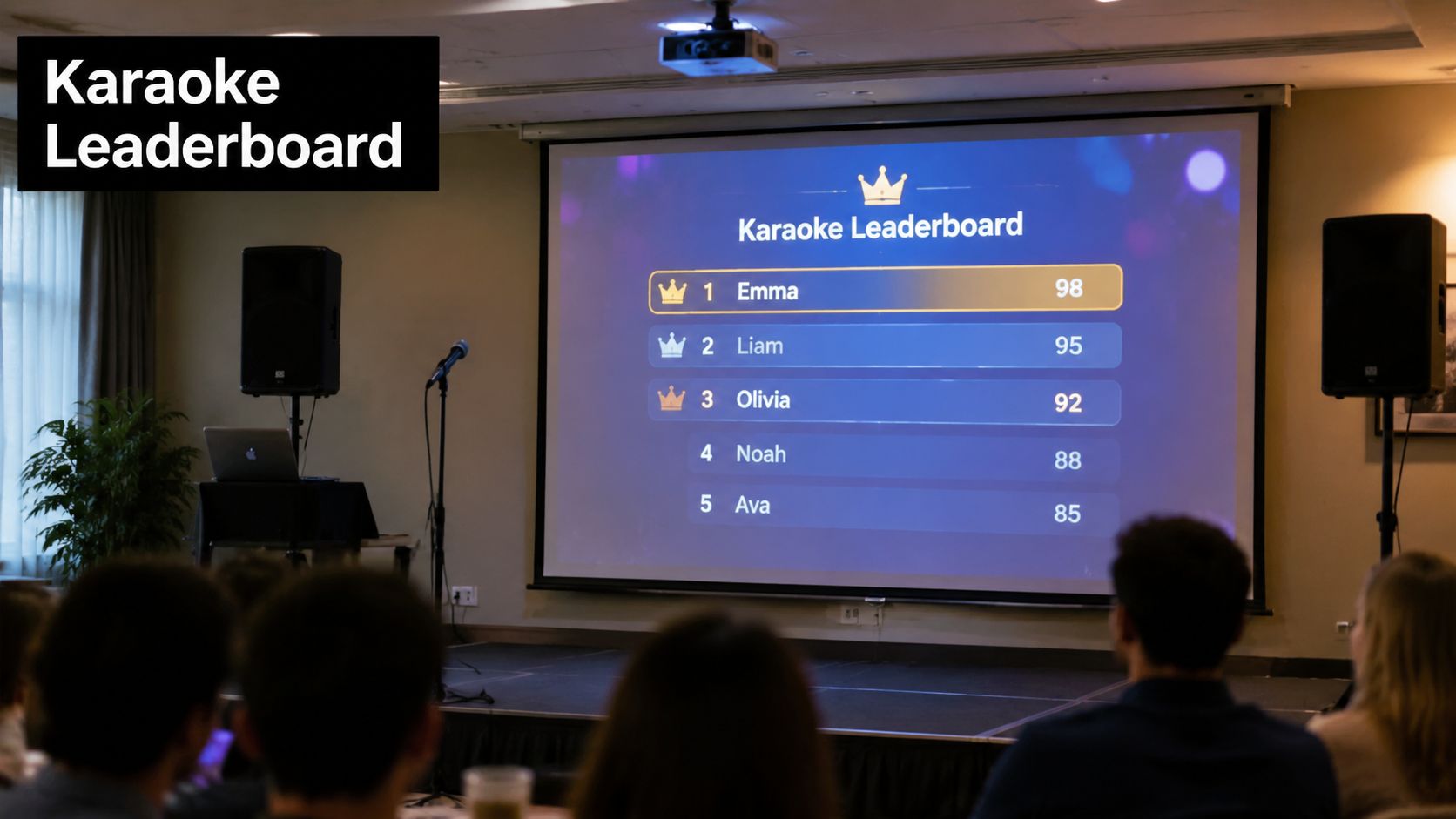
The scoring feature can add energy, but it can also shift the mood. Competitive scoring is effective when participants have agreed to compete and the host explains the rules clearly. It can feel uncomfortable at a birthday party or school event if the system appears to rank casual singers without context. A DJ should decide whether scores are central to the activity, used only as a novelty, or turned off entirely.
Use the display to manage attention
A large lyric screen isn't just a convenience for the singer. It tells the audience what is happening, gives the next performer a clear cue, and can show scores or event branding. Check the projector position from the back of the room. Lyrics that look readable beside the DJ table may be too small or washed out once guests move farther away.
For a smoother competition format:
- Create defined brackets: Group departments, age ranges, or teams only when the event audience supports that structure.
- Use duets strategically: Pairing colleagues or friends can reduce the pressure on first-time singers.
- Load the next tracks early: A prepared queue prevents long searches between performances.
- Assign a queue operator: At a large event, one person should manage requests while the DJ protects sound, lighting, and transitions.
- Test the scoring display: Confirm that graphics, lyrics, and scores remain visible under the venue's actual lighting.
Karafun is less effective when connectivity is uncertain and the operator hasn't prepared offline alternatives. Streaming convenience can tempt a DJ to rely on live searching, but that approach exposes the show to buffering and content surprises. It also doesn't solve licensing responsibilities for a public event. Confirm what the venue, platform, and event organizer are responsible for before advertising karaoke as part of the program.
4. Pioneer DDJ-400 DJ Controller With Serato DJ Lite Karaoke Software
A Pioneer DDJ-400 paired with Serato DJ Lite represents a more integrated approach. Instead of treating karaoke as a separate app beside the DJ set, the operator can manage transitions, effects, music playback, and singer support from a familiar controller-based workflow. This is the right direction for a full-service DJ who needs to protect dance-floor energy while adding performances.
The controller doesn't make the operator a better karaoke host by itself. Staff need to understand gain staging, microphone feedback, cueing, track preparation, and the practical differences between a DJ transition and a singer waiting for lyrics. A professional setup also needs a clear plan for who handles requests, who passes microphones, and who watches the display.
Place the controller where the DJ can reach it without turning away from the room. A laptop screen may show the track, but the performer and audience still need a separate, properly positioned lyric display. Run a full sound check before guests arrive, checking microphone levels, music balance, monitor placement, and the route from the karaoke software into the main PA.
Practical rule: Treat every karaoke block as part of the DJ set. End the backing track cleanly, introduce the next singer quickly, and have the following dance track ready before the performance finishes.
Protect the dance floor
A strong mixed-format schedule usually uses short karaoke blocks rather than allowing an unbroken line of singers to replace the party. Follow a planned sequence, such as a dance set, a small group of performances, a DJ transition, and another dance set. Keep song requests in a visible queue and cap the number of consecutive solos when the room includes guests who came primarily to dance.
Use hot cues or organized folders for icebreakers, group songs, featured performers, and closing numbers. Bring offline track files on backup drives, and keep a second controller or technician plan for long events where one equipment failure could stop both the DJ and karaoke sides. For broader event-production support, see DJ party entertainment from Phantom Entertainment.
The controller and software combination is less portable and less forgiving than a phone-based setup. It also demands trained staff. For operators who already run professional DJ events, that trade-off is worthwhile because the system gives them a unified way to manage the room.
A short demonstration can help staff understand the controller workflow before event day.
5. Spotify Plus Splacer or Smule Duet Integration
This hybrid approach appeals to tech-forward audiences who already use phones for music discovery, social sharing, and collaborative performance. Spotify can provide the listening framework, while Smule or a comparable duet-oriented service adds a participatory layer. It can work for university orientation, graduation celebrations, youth gatherings, and informal teen parties where the audience expects to interact through personal devices.
The weakness is consistency. A song that works as a listening track isn't automatically a suitable karaoke backing track. Some requests may have no usable duet option, some features may depend on account access, and the performance experience can vary between phones, headphones, Bluetooth connections, and the venue's PA. The DJ needs to set expectations before the first singer steps up.
Keep personal devices out of the critical path
Use Spotify playlists as a planning tool, not as permission for every guest to control the sound system. Build approved lists by era, genre, and energy level, then let the operator select what reaches the speakers. If participants use their own devices, establish one audio route and one microphone route so the DJ can keep volume stable.
Plan for the following:
- Test venue connectivity: Check whether the network can handle the event's expected activity instead of assuming it will support multiple simultaneous streams.
- Prepare a hotspot fallback: Keep a mobile connection available, but test it in the actual performance area.
- Confirm duet access: Tell participants if specific songs or features require a paid account or compatible device.
- Bring a local backup: A separate speaker or offline karaoke source can keep a small performance area active if the main connection weakens.
- Control social sharing: Hashtags and duet recordings can boost participation, but obtain the permissions required for recording and posting guests.
This option is best for casual, youth-focused events where spontaneity is part of the appeal. It isn't the strongest choice for a formal corporate program, a public festival, or any event where every performance must sound and look consistent. Streaming services also don't automatically settle public-performance obligations, so the organizer should confirm licensing responsibilities instead of treating a consumer subscription as event clearance.
6. Numark Mixtrack Platinum With Serato DJ Lite
At a wedding, university event, or family fun day, the DJ may need to move from a full dance set to a singer's request without changing the entire setup. The Numark Mixtrack Platinum with Serato DJ Lite supports that shift with physical controls for cueing, levels, transitions, and performance timing. It suits mobile DJs and rental companies that need more control than an app provides without transporting a large production rig.
Its value depends on the operating package around it. Serato DJ Lite can organize music and karaoke tracks, while the controller gives the operator faster access than a laptop trackpad. Song access still requires preparation. Confirm that backing tracks are available locally or through a dependable source, and check licensing responsibilities for the event rather than assuming software access covers public performance.
Build the system around event flow
Use separate folders or crates for opening music, group numbers, age-appropriate selections, higher-energy songs, and scheduled karaoke blocks. This keeps the DJ from searching through the entire library while a performer is waiting. Queue control remains an operator task. The controller can make requests faster to handle, but it cannot prevent one guest from dominating the microphone or a slow song from weakening the room's energy.
A dependable setup includes:
- Microphone options: Test the wireless system, batteries, receiver position, and interference before doors open. Keep a wired microphone ready if the wireless range becomes unreliable.
- Standardized preparation: Label cables, save laptop settings, and document the startup sequence so different staff members can reproduce the setup.
- Fast controls: Assign useful pads or shortcuts to common requests and planned group performances.
- Backup access: Keep important tracks available offline when connectivity is uncertain, and bring spare adapters and cables.
- Protected transport: Use a fitted case and shield the controller, laptop, and microphones from spills and weather during outdoor work.
The equipment is portable, but it is not self-managing. A DJ still has to choose songs that fit the audience's age and mood, place performances into the program, and return to regular music before the queue stalls. Wireless microphones also add setup and interference checks that a basic wired arrangement avoids.
For operators combining DJ work with wider event entertainment, review Phantom Entertainment's disc jockey services. The Mixtrack setup fits bookings that need repeatable handling, quick transitions, and selected karaoke segments without the cost or transport demands of a larger professional system.
7. YouTube Karaoke With Backing Track Curation
A guest requests a popular song, the DJ searches YouTube, and the first result opens with an advertisement or an incorrect arrangement. The room waits while the operator checks lyrics, volume, and ending. YouTube can support a low-cost karaoke program, but only when the DJ treats it as a prepared song source rather than an open search tool.
Schools, nonprofits, community festivals, church youth groups, and casual private events can build playlists in advance and display videos through a projector. Song access is broad, yet track quality varies. Lyrics may be inaccurate, backing levels may change between uploads, and some videos include long intros, abrupt endings, or unreadable on-screen text. Audience age also matters. A playlist for children, families, or older guests needs different song choices and pacing.
Curate for the room, not the search bar
Build separate playlists for the opening, group participation, energetic performances, and closing songs. Watch each selection far enough to confirm the lyrics, arrangement, volume, and ending. Keep the DJ in control of the queue, because unrestricted guest searching can introduce unsuitable content and interrupt the event rhythm.
Before doors open, check:
- Connection and playback: Test internet reliability in the actual venue. Prepare a wired or mobile fallback if service is uncertain.
- Audience visibility: Read the lyrics from the back of the room, not only from the operator's position.
- Advertisements and interruptions: Monitor playback and know how to resume the queue without leaving performers waiting.
- Backup media: Keep legally obtained alternatives available where public use is permitted.
- Licensing: A freely accessible video is not automatically cleared for public performance.
Operators who need an audio-only workflow can review how to extract audio from YouTube. Extraction does not remove copyright or licensing obligations, so downloaded material still requires appropriate clearance for the event.
YouTube suits a backyard party or resource-limited community program where occasional playback issues are manageable. It falls short for events requiring guaranteed availability, consistent track standards, polished transitions, or a DJ focused on performers instead of troubleshooting. Test every planned song, keep the queue short enough to manage, and return to regular DJ music when the karaoke line slows.
8. GarageBand on Mac With iPhone Integration
At a family gathering, an operator may need one prepared song after another, while also watching the room, microphones, and DJ music. GarageBand gives Apple users a flexible DIY route for that setup. Prepared backing tracks, or tracks processed for vocal removal, can run from a Mac, iPhone, or iPad into the event's speaker system. It fits family gatherings, small educational programs, informal college events, and music-focused groups that enjoy shaping the performance environment.
The trade-off appears when guests expect a searchable catalog and fast requests. Vocal removal can leave artifacts, weaken instruments, or remove arrangement parts a singer needs. A track that sounds fine in headphones may reveal gaps or processing problems through a larger PA, so test important songs before the event.
Build a prepared performance set
Use a separate GarageBand project for each event. Group tracks by performer, group, era, or energy, then keep a printed song list nearby. That list lets guests choose songs without forcing the operator to scroll through projects while managing microphones and room flow.
A practical setup includes:
- Proper room speakers: Phone and tablet speakers cannot carry an event space effectively.
- Charged Apple devices: Keep the iPhone or iPad connected to power during playback.
- Stable audio routing: Bluetooth reduces cable clutter, but crowded rooms can cause drops or pairing confusion. A wired route is easier to control when available.
- A second speaker: Backup output gives the host a way to continue if the primary connection fails.
- Early rendering: Vocal-removal processing and file preparation take time. Finish the catalog before load-in rather than building it during setup.
Song access and queue control depend on preparation. GarageBand does not provide the broad, searchable library of a dedicated karaoke service, so limit the menu to tracks the operator has checked for arrangement, lyrics, and audience fit. Keep age range in mind when choosing the set, and return to regular DJ music when the karaoke line slows.
GarageBand works for informal events where participants accept some experimentation. It falls short when performers need polished lyrics, instant requests, consistent track quality, or a host who can run karaoke and DJ music without switching among creative projects. Use it as a planned sequence of performances, not an on-demand public library.
DJ Karaoke Music: Top 8 Tools Comparison
| Solution | Implementation 🔄 | Resources ⚡ | Expected outcomes ⭐📊 | Ideal use cases | Key advantages 💡 |
|---|---|---|---|---|---|
| Singa Karaoke App | Low, install app on devices; designate a DJ device | Smartphone/tablet + reliable internet; optional external speakers; subscription | Large, up-to-date song library; good vocal effects; variable device audio quality ⭐⭐⭐ 📊 | Budget-conscious events, parties, mobile DJs | Massive catalog (3M+); portable; real-time effects; easy for staff |
| Pacemaker Digital Karaoke Library | Medium‑High, integrates with DJ software/hardware | Pro audio hardware or DJ software; paid subscription; licensing | Studio-grade backing tracks and keys; consistent performance quality ⭐⭐⭐⭐ 📊 | Professional event companies, weddings, corporate functions | High-bitrate tracks; key variations; public performance licensing |
| Karafun Player (Software & Streaming) | Medium, desktop/mobile setup, projector/AV configuration | Desktop or mobile app + A/V gear; subscription for streaming | Engaging gamified experience with scoring, duets, queue control ⭐⭐⭐ 📊 | Competitive karaoke, corporate talent shows, venues | Scoring/leaderboards, duet mode, customizable graphics |
| Pioneer DDJ-400 + Serato DJ Lite | High, hardware + software, trained operator required | DDJ-400 controller + laptop + audio system; capital investment | Professional, seamless DJ+karaoke control; durable performance ⭐⭐⭐⭐ 📊 | Large events requiring continuous DJ + karaoke services | Full DJ mixing + karaoke mode; single-operator workflow; industry standard |
| Spotify + Smule / Splacer Integration | Low, app-based, minimal setup for users | Spotify account(s) + Smule (optional premium) + solid Wi‑Fi | Highly social, modern experience; variable backing quality ⭐⭐ 📊 | Tech-forward, youth-focused campus or social events | Huge song catalog (80M+); social sharing; low marginal cost |
| Numark Mixtrack Platinum + Serato | Medium, mid-range controller + software setup | Mixtrack controller + laptop + audio outputs; moderate cost | Reliable, transportable mid-tier performance for rentals ⭐⭐⭐ 📊 | Rental companies, university events, weddings | Durable construction, professional features at mid-range price |
| YouTube Karaoke (curated backing tracks) | Low, playlist curation and projector setup | Internet + projector/speakers; free access (ads/YouTube Premium opt.) | Extremely low-cost but inconsistent audio/availability; legal caveats ⭐ ⭐📊 | Community groups, schools, nonprofits on tight budgets | Massive free catalog; familiar platform; easy playlist creation |
| GarageBand (Mac) + iPhone Integration | Medium, prep and track editing required | Apple devices (iPhone/iPad/Mac); Bluetooth speakers; time for prep | Portable DIY solution; vocal removal imperfect; high creative control ⭐⭐ 📊 | Small informal Apple-ecosystem events, educational workshops | No subscription for Apple users; offline use; multitrack editing |
Turn a Song Library Into a Smooth Event
Start with the audience and event type, then choose the system. A family fun day may need recognizable group songs, clean selections, and a host who can move between children, parents, and general entertainment. A university event may favor current music, duets, social sharing, and fast mobile requests. A corporate program may benefit from planned team performances, branded displays, and a controlled queue rather than unrestricted guest searching.
Next, divide the catalog by age group, genre, and energy level. Don't organize only by artist or alphabet. A DJ needs to answer practical questions quickly: Which songs can a first-time singer handle? Which tracks bring a quiet room together? Which performances can follow a dance set without draining momentum? Which songs should wait until the audience is ready for a slower moment?
Queue control determines whether the technology feels professional. Use a visible request process, collect the singer's name, confirm the song and key when relevant, and tell guests roughly when they'll be called. Keep the next track prepared while the current singer performs. If the line grows, pause new requests or move some choices into a later block instead of allowing the queue to overwhelm the schedule.
Alternate solo performances with duets and group songs. A long run of solo singers can turn dancers into spectators, while group numbers give the wider audience a reason to participate. Short DJ-led transitions also matter. A brief introduction, a clean ending, or a quick return to a familiar dance track can prevent dead air and keep the room's energy connected.
Internet-dependent systems need tested connectivity and offline backups. Test the venue network in the performance area, not just at the planning desk. Keep local tracks, backup devices, spare cables, charged microphones, and a second playback path ready. Hardware reliability matters because the karaoke equipment market is forecast to grow from USD 712 million in 2024 to USD 816 million by 2034, with a 2.0% CAGR, according to Market Research Future's karaoke equipment market estimate. That forecast supports a practical buying principle, choose durable, portable equipment that reduces setup complexity rather than chasing features you won't use.
The wider category is also established. One market summary estimated global karaoke revenue at $5.4 billion in 2023 and projected $5.9 billion in 2026, while reporting that Asia-Pacific held 55% of global market share in 2023. Those figures come from Market.us karaoke statistics. Japan remains the foundational market, with modern karaoke roots tracing to the latter half of the 1960s and its broader karaoke business described as nearing ¥1 trillion annually when related software, content, app, and in-car revenue are included, as documented by Nippon.com.
Finally, confirm public-performance responsibilities. A consumer app, a streaming subscription, or a free video platform isn't automatically cleared for use at a public event. Ask the venue, platform provider, and event organizer who handles licensing, and document the answer before advertising the entertainment package.
For most professional bookings, the strongest choice is a managed DJ-and-karaoke package. It combines song access with trained queue control, sound checks, wireless microphones, display management, transitions, and a backup plan. Phantom Entertainment offers karaoke systems with a host and can coordinate karaoke alongside broader event entertainment, which is useful when delivery, setup, operation, and guest flow all need one responsible team.
Choose the simplest system that can reliably serve your audience. For an informal gathering, that may be a prepared YouTube or GarageBand setup. For a school, corporate, municipal, or large family event, reliability and guest management usually matter more than saving time on the initial software choice.
Phantom Entertainment provides hosted karaoke, DJ entertainment, delivery, setup, and professional operation for events across Pennsylvania and the Mid-Atlantic. To plan a coordinated event package with dependable dj karaoke music and other attractions, visit Phantom Entertainment and discuss your venue, audience, schedule, and equipment needs.
Ready to Book Your Event?
PA state-inspected, fully insured since 1979. Call us or get a free quote today.