
You're planning a company picnic, school field day, wedding reception, or community festival, and the entertainment list looks straightforward until you ask the practical questions. Where will the booth go? Will guests have room to pose? Can the venue support the equipment? Who handles paper jams, setup, and teardown?
An arcade photo booth can be one of the easiest attractions to understand and one of the easiest to mismanage. The cabinet design draws people in, the self-service controls keep participation simple, and instant prints give guests something tangible to take home. But the experience only works smoothly when the planner accounts for footprint, power, lighting, access, staffing, and customization before event day.
What an Arcade Photo Booth Actually Feels Like at an Event
The first sign that an arcade photo booth is working usually isn't the camera flash. It's the crowd forming around it.
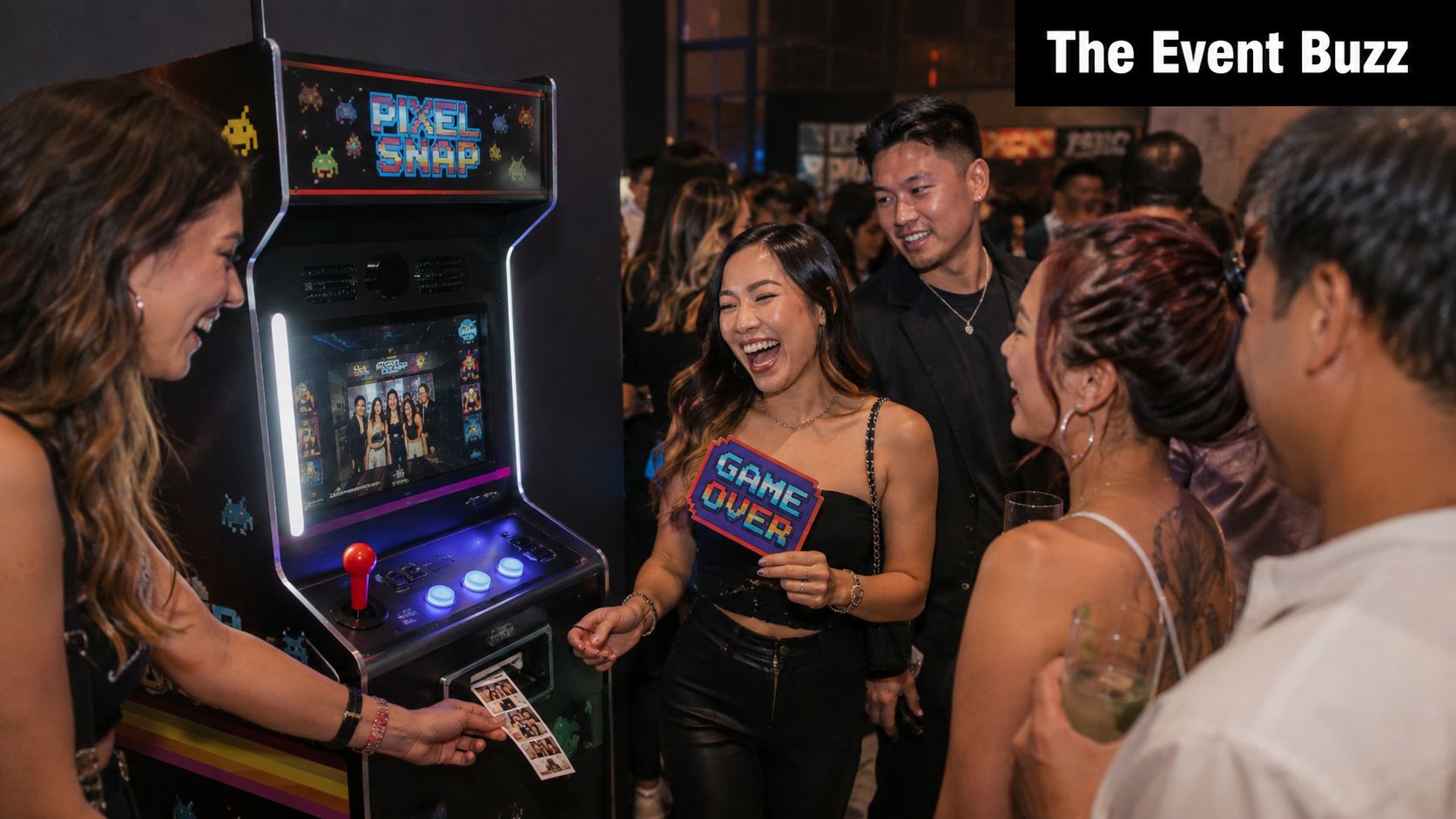
At a mid-sized family event, a child spots the glowing controls and reaches for the joystick. An adult follows to help with the first session, then stays for the next photo. Someone grabs oversized glasses from the prop table, another guest joins from the edge of the room, and the cabinet's sound effects turn a quiet corner into a small social hub. The booth doesn't need a host to explain every step because the arcade-style interface invites people to interact with it.
The group changes constantly. Kids test the buttons, parents pose with relatives, and older guests often enjoy the familiar cabinet shape as much as the photos. When the strip prints, someone holds it up for the group, another person takes a phone picture of it, and a third guest suggests adding a copy to the event guest book.
Why the cabinet creates social gravity
A conventional kiosk can be useful, but it may blend into the room. The arcade cabinet has a visual identity before anyone uses it. Its physical controls, upright screen, lighting, and throwback shape make the attraction visible from across the venue.
That design changes guest behavior. People don't approach only because they want a formal portrait. They approach because the booth looks playable, and that lowers the pressure of stepping in front of a camera. The result is usually more movement, more group participation, and a less staged feel.
The working definition matters for planning. This isn't just a camera on a stand with a backdrop. It's a freestanding entertainment station that combines a playful interface, photo capture, optional printing, and digital sharing. Once you understand that, placement becomes part of the experience rather than an afterthought.
Defining the Arcade Photo Booth and How It Differs
An arcade photo booth is a freestanding cabinet built in the visual style of a classic arcade machine. It typically combines a display, camera, physical controls, lighting, software for taking photos, and an onboard printer. Guests operate it themselves, while an attendant or rental crew remains available to keep the system running.
The arcade label describes both the appearance and the interaction model. The cabinet encourages guests to touch, choose, pose, and repeat. It prioritizes play and shareability over the controlled, formal look associated with a studio portrait station.
The differences planners need to understand
An enclosed DSLR mirror booth is designed around a more private portrait experience. It often uses a mirror-style display, a dedicated backdrop, and a polished presentation that suits weddings or formal receptions.
An open-air iPad booth usually places a tablet on a stand near a backdrop. It can be lightweight and flexible, but it doesn't provide the same physical cabinet presence or joystick-driven interaction.
A full arcade game cabinet is different again. It may look similar, but its purpose is gameplay rather than photography. It won't necessarily include a camera, photo software, printer, or sharing workflow.
The arcade aesthetic draws on the late-1970s and 1980s arcade look, then adapts that visual language for modern event entertainment. That revival matters because guests recognize the format immediately, even if they have never rented a booth before.
Practical distinction: Choose an arcade photo booth when you want the booth itself to act as an attraction, not just as a background for formal portraits.
For planners comparing options, Phantom's 360 photo booth experience belongs to a different category. A 360 platform emphasizes movement and video capture around the subject, while an arcade booth centers on a cabinet, direct controls, still photos, and optional instant prints. Neither format is automatically better. The choice depends on whether your event needs a playful stationary station or a more immersive video moment.
Key Features and Customization Options
A booth can look impressive in a product listing and still create queues or setup problems at an event. Judge each feature by its effect on guest flow, operator workload, footprint, and the venue's available services.
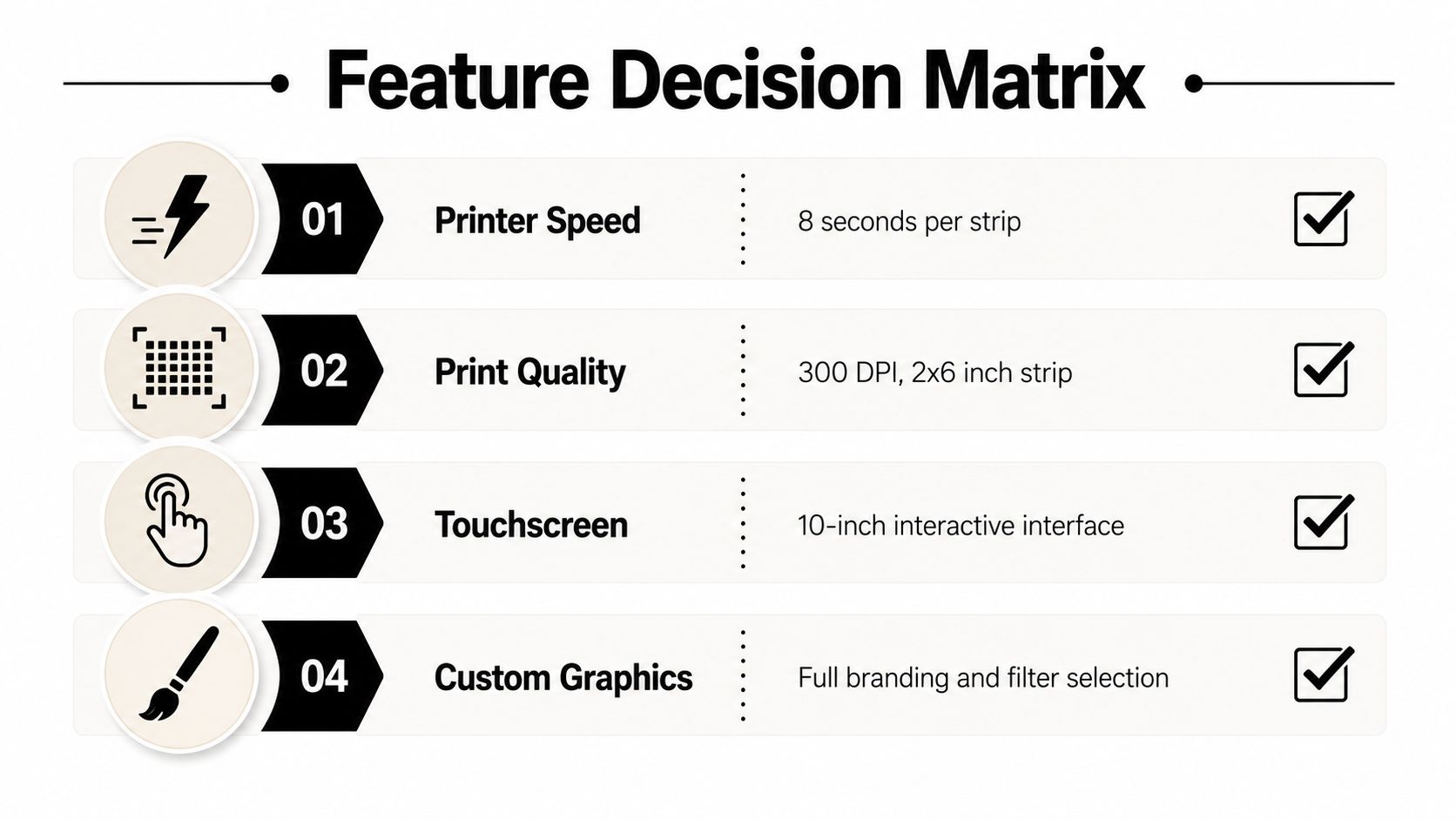
A compact unit may include a 7-inch touchscreen, 16 GB of internal storage, and microSD expansion. Its footprint can be about 15.7 by 2.6 by 23.6 inches, with a weight of about 11.6 pounds, according to a commercial arcade photo booth listing. That format can sit on a table, door, or other flat surface. Larger rental packages may use an i7-class computer, Canon M50 camera, LED ring lighting, and custom LED accents. Those upgrades can improve presentation, but they also affect transport, placement, and setup time.
Hardware decisions that affect queues
The printer often sets the pace in a busy room. Dye-sublimation systems can produce a standard 4x6 print in roughly 8.3 to 8.4 seconds, with the first print ready in about 10 seconds. High-volume use can support around 400 or more prints per hour, according to this dye-sublimation photo booth printing guide.
That capacity helps when several groups reach the booth together. Faster cycles shorten each group's time at the station, while the printer, media, and replenishment requirements can increase the rental cost. Confirm who monitors supplies and what happens if the print queue builds.
The interface changes how quickly guests understand the booth. A larger touchscreen makes prompts and effects easier to follow. A joystick and physical buttons reinforce the arcade feel. LED lighting draws attention to the cabinet, but it does not replace suitable room lighting for faces.
Customization is a workflow, not just decoration
Brand overlays, logos, themed graphics, props, and digital sharing can make the booth fit the event. Custom artwork needs review time when a school, company, sponsor, or university must approve the design.
Text, email, or QR-code sharing extends access beyond the physical print, but it depends on a reliable connection. If venue Wi-Fi is uncertain, plan for a cellular hotspot or a print-first fallback.
A promotional selfie frame board can support a sponsor, school, or company theme without changing the booth software. Phantom Entertainment's dye-sublimation printing service fits bookings where instant physical output is central. Confirm which graphics, props, print quantities, and digital features are included, and which require an add-on.
Best Event Use Cases for an Arcade Photo Booth
An arcade photo booth earns its floor space when guests have open time, can gather in small groups, and do not need to follow a strict sequence. The cabinet becomes harder to use when the program leaves only brief transitions or requires quiet, constant movement.
Wedding cocktail hours and reception gaps give guests enough time to approach, pose, review images, and collect prints. Strips can serve as favors, guest-book additions, or informal reminders of the day. A custom overlay can match the wedding design while keeping the booth casual rather than turning it into a formal portrait station.
Corporate picnics and holiday parties can use the booth for more than logo placement. A digital sharing workflow may let employees distribute photos internally or post them socially, subject to company privacy and communications policies. Planners considering physical frames, giveaways, or branded props can also review Raccoon Transfers' promotional products for events before deciding what belongs beside the booth.
Schools and universities often see strong participation because the cabinet is intuitive and self-service. Field days, prom after-parties, orientation programs, homecomings, and graduation events can use school colors, mascot graphics, themed props, and shareable templates. Church festivals, nonprofit fundraisers, and neighborhood events gain a low-pressure activity that can include several age groups without requiring formal instruction.
Where the format fits best
| Event Type | Typical Use Window | Customization Fit | Engagement Level |
|---|---|---|---|
| Wedding reception | Cocktail hour and reception gaps | Wedding overlays, guest-book prints, themed props | High |
| Corporate picnic | Open activity periods and family programming | Logos, campaign graphics, digital sharing | High |
| School field day | Free-choice activity blocks | School colors, mascot graphics, fun props | High |
| University orientation | Welcome periods and evening socials | Campus branding, filters, shareable templates | High |
| Church or nonprofit event | Festival, fundraiser, or community activity windows | Mission graphics, seasonal props | Broad mixed-age appeal |
| Formal seated dinner | Short transitions only | Possible, but limited | Variable |
Schedule the booth around guest behavior, not just the event type. A ceremony, presentation, or tightly timed dinner may leave too little time for a complete session and print pickup. Placement near a natural waiting area, lounge, or circulation point gives guests room to stop without blocking service routes or competing with the program. For planners working with Phantom Entertainment, sharing the run-of-show and floor plan early helps match the booth package and delivery plan to the actual event schedule.
Space, Power, and Setup Logistics
A booth that fits the venue plan runs smoothly. One placed in a doorway, on uneven ground, or far from power creates delays before guests arrive. Start with the floor plan, then confirm the rental package.
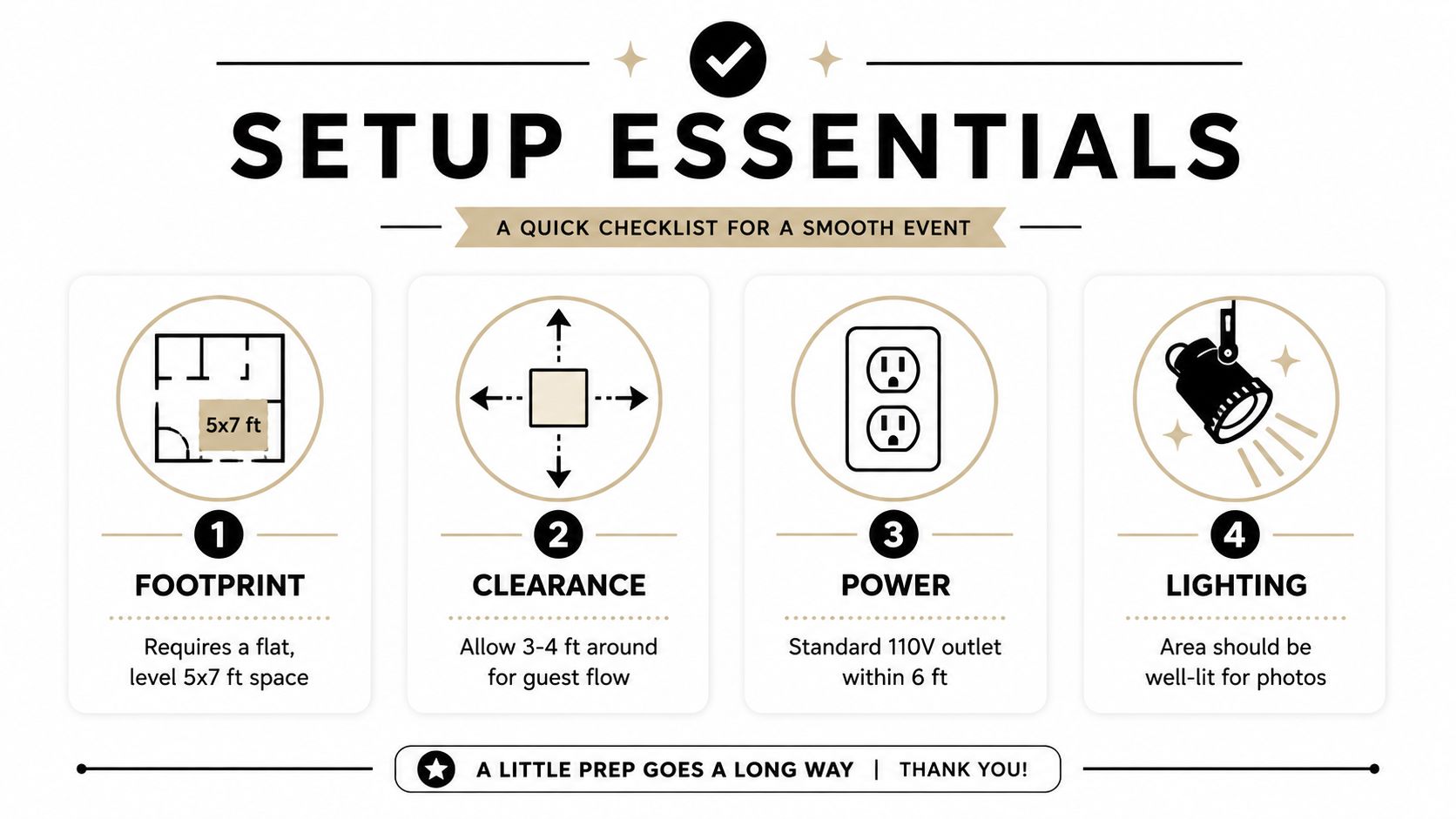
Most arcade cabinets need a flat footprint of roughly 5 by 7 feet, with 3 to 4 feet of clearance in front for posing, guest movement, and a prop table. Requirements vary by equipment, so send the operator a measured floor plan or venue photo before delivery.
Venue checklist
- Reserve a level area: Avoid sloped floors, loose gravel, soft ground, and spots where doors open into the booth.
- Protect the guest path: Keep the queue, prop table, and posing area clear of service routes.
- Confirm electrical access: A compact package may use a standard outlet. A printing package can draw around 20 amps total, or about 8 amps without printing, based on the commercial equipment listing. Ask whether the venue requires a dedicated circuit.
- Plan outdoor protection: Use a covered, dry surface and confirm exterior power or generator arrangements before arrival.
- Control sunlight: Direct sun can make the screen hard to read and make the posing area uncomfortable. Provide shade or tenting outdoors.
Allow at least 1 hour for setup, according to this photobooth setup FAQ. Actual timing depends on the booth, props, graphics, access route, and venue rules. Confirm loading dock access, elevator dimensions, parking, noise restrictions, and teardown timing during booking.
For Phantom Entertainment deliveries, early floor-plan and run-of-show details help align equipment, access, and setup timing with the venue's constraints. Keep an attendant available to reload paper, clear jams, reset sessions, and keep guests moving.
The Rental Process and What Drives Pricing
A workable rental begins with a detailed quote, not a request for “a photo booth.” Provide the event date, venue address, guest profile, rental window, expected traffic, print format, branding requirements, and access restrictions. These details let the operator match the package to the venue instead of quoting a generic kiosk.
The confirmation should name the equipment package and each add-on. Custom overlays, guest books, extra print packs, props, digital sharing, delivery timing, and staffing can all change the scope and final price. Ask what the operator supplies, what the venue must provide, and who handles problems during the event.
Four decisions shape the budget
Duration covers more than guest-facing operation. Delivery, setup, monitoring, and teardown require labor, so a short reception and an all-day school event call for different plans.
Print volume determines paper and ink needs. A busy event may require extra print capacity even when the booth is rented for a limited window.
Travel distance affects delivery planning and may change the quote when the venue sits outside the operator's usual service area.
Staffing changes both labor and guest flow. A self-service kiosk may cost less to operate, while an attendant can explain features, manage queues, reload supplies, and protect the equipment.
Seasonal demand can affect availability and rates around prom, wedding season, and December holidays. Request an itemized quote separating delivery, setup, operating time, customization, print supplies, overtime, and damage terms.
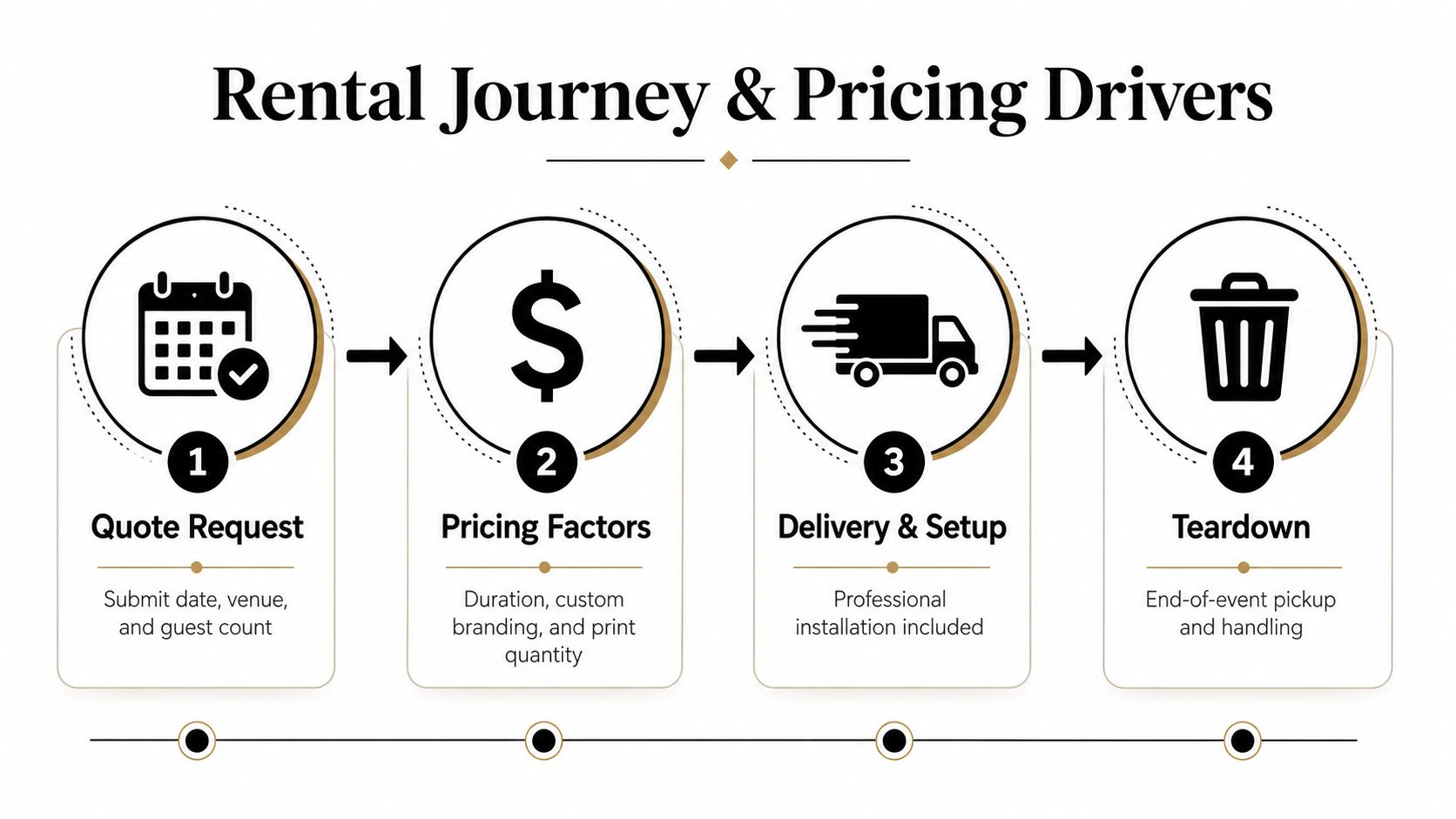
From booking to pickup
After the operator confirms the date and scope, the team prepares graphics and supplies, arrives within the agreed setup window, tests the booth, and monitors it when staffing is included. Once guests leave, the crew tears down and removes the equipment.
A photo booth rental service can also help planners compare related options, such as photo buttons, keychains, lounges, magnets, or mugs, alongside the main booth. Keep the quote specific. If delivery windows, overtime, venue handling charges, or pickup responsibilities are unclear, resolve them before signing.
Why Renting from Phantom Entertainment
The strongest case for a turnkey operator is risk control. A planner who rents a self-setup kiosk may still need to manage delivery, assembly, cables, printer supplies, troubleshooting, pickup, and venue compliance. Those tasks compete with registration, catering, safety checks, and the rest of the event schedule.
Phantom Entertainment handles delivery, setup, and teardown for its arcade photo booth rentals. Its attractions are fully insured, and the company provides certificates of insurance and venue-ready safety documentation, which can simplify requirements for schools, campuses, corporate venues, churches, and municipal events.
One vendor can simplify a larger event
The photo booth may be only one part of the activity plan. Phantom's inventory also includes inflatable games, obstacle courses, mobile escape rooms, mechanical bulls, mobile zip lines, rock walls, laser tag, paintball, casino nights, arcade games, mini golf, virtual reality, carnival games, DJs, karaoke, and other attractions.
That broader inventory can reduce coordination overhead when an event needs several entertainment stations. Instead of managing separate delivery schedules and liability documents for every attraction, a planner can ask one provider to coordinate a larger event floor.
The staffing model also matters. When the same crew delivers the equipment and stays available through the event window, they understand the setup and can address routine issues without sending the planner searching for a manual or spare cable.
A turnkey rental doesn't remove every event risk. It moves equipment handling and operational troubleshooting to the people assigned to manage them.
For a school, university, company, or nonprofit, that distinction can be more valuable than a novelty feature. The planner still needs to confirm space, power, access, timing, and package inclusions, but the vendor owns the practical execution instead of leaving it to volunteers or venue staff.
Planning Your Arcade Photo Booth Rental
A smooth arcade photo booth rental starts with venue details, not the quote. Confirm these items before booking:
- Measure the area: Allow space for the cabinet, guest flow, posing, and props. A 10 by 10 foot planning area helps assess the layout, but verify the selected unit's exact footprint.
- Map guest traffic: Place the booth near natural foot traffic without blocking food service, registration, exits, or emergency routes. Check the busiest activity window so staffing and placement match actual demand.
- Confirm power: Identify a nearby grounded outlet. Ask whether printing needs a dedicated circuit, especially in an older venue or a room sharing power with catering equipment.
- Choose the output: Decide whether guests receive instant prints, digital sharing, or both. Confirm print quantity, paper format, and any limits in the package.
- Approve the look: Send logos, colors, overlay text, backdrop preferences, and prop ideas early enough for review and production.
- Lock access details: Provide the venue contact, loading instructions, elevator information, noise rules, and teardown deadline.
- Protect the schedule: Add a 30-minute setup buffer at each end of the rental window. Confirm whether an attendant remains onsite and who handles routine issues.
Ask for a written quote listing delivery, setup, teardown, staffing, customization, and supplies. Those details expose gaps before event day and leave less work for volunteers or venue staff.
Phantom Entertainment provides arcade photo booth rentals with delivery, setup, teardown, and event support, plus attractions for schools, corporate events, family celebrations, and community programs. Visit Phantom Entertainment to review available options and request a quote based on your venue, schedule, and guest experience.
Ready to Book Your Event?
PA state-inspected, fully insured since 1979. Call us or get a free quote today.